


Chick-fil-A®
4.569.52K Reviews
App Specs
- Version
- 2026.13.1
- Updated On
- License
- Free
- Downloads
- 10,000,000+
- Developer
- Chick-fil-A, Inc.
- Categories
- Food & Drink
- Platform
- Android, iOS
Screenshots
 Analysis by AppCompare
When I decide whether a restaurant app is worth keeping, I look beyond the menu: can I place a familiar order without rebuilding it, does it help me time a pickup, and are the rewards useful enough to justify another account? The Chick-fil-A® app makes the most sense when I already choose Chick-fil-A regularly. It puts ordering, order history, and rewards in one place, but it is less compelling if I only visit occasionally or want a single app for many restaurants.
What to consider before installing
This is a free food-and-drink app from Chick-fil-A, Inc., intended for people who want to order from that restaurant rather than compare menus across chains. It has a 4.5 average from around 205,000 ratings, and has passed 10 million installs. Those figures suggest it is widely used, though they cannot tell me whether it will suit your routine. It is rated for Everyone, and the app has been available since December 20, 2013.
The practical question is whether you expect to order ahead often enough to benefit from saving your account details and revisiting earlier orders. If you are feeding yourself on a predictable lunch break, or placing the same family order every week, a dedicated restaurant app can remove small bits of friction. If your visits are rare, browsing the menu in person or ordering when you arrive may be just as easy.
I would also think about the kind of choice you want. This app is focused on one restaurant’s menu and ordering flow, rather than acting as a directory for nearby places. That focus is a strength when you already know where you want to eat; it is a limitation when the real decision is which restaurant to choose.
How the app fits a real ordering routine
I find the app most useful when it supports a routine I already have, rather than when I expect it to decide what to eat. Before ordering, I think through pickup timing, any changes to familiar items, and whether a reward is worth using on this visit. That practical checklist leads into how the app fits into an ordinary ordering day.
First Impressions and Usability
Jumping right in, the app is super clean and easy to navigate. When you open it up, you're greeted with an intuitive layout that makes finding what you need a breeze. Whether you’re browsing the menu or checking out the latest deals, everything is neatly organized. And speaking of deals, who doesn’t love saving a few bucks, right?
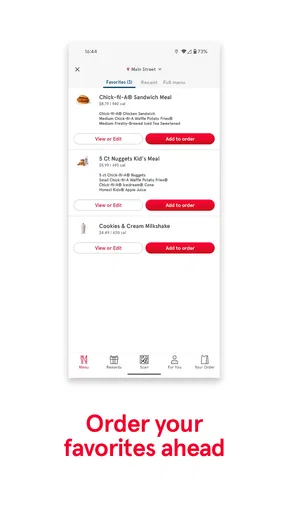
Setting up an account was straightforward. I appreciated the security steps they have in place, which made me feel my info was safe. Once logged in, you can see your past orders, making repeat orders a snap. It’s like they know exactly what you want before you even ask!
Worth Reading Before You Choose

EA SPORTS FC Mobile 26 Is a Bigger Football Game, but It Takes Time

Flipboard Shows What News Apps Must Do Beyond the Feed

Switching to Android Auto Means Rethinking Your Driving Routine

Google Calendar Makes a Crowded Week Easier to Manage

Ludo King Makes the Most of the Minutes Between Plans

Baby Panda World Brings Quick Play to Modern Phones, but Its Game Library Feels Busy
Ordering and Customization
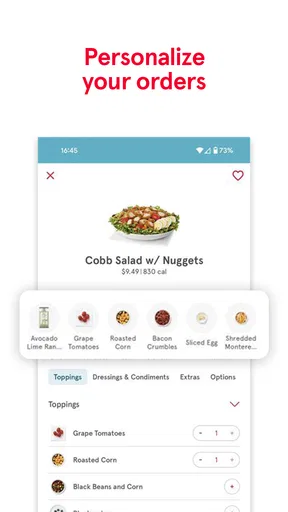
The ordering process is where the Chick-fil-A® app really shines. You can customize your order down to the last detail. Want extra pickles, or need to swap out the bun? No problem. The app gives you the flexibility to tailor your meal just the way you like it.
That flexibility is especially useful for repeat meals, but I would still pause at the final review rather than tap through on autopilot. Check each item and its changes before submitting, especially when ordering for someone else: a saved routine is convenient, but it is easy to overlook a small preference when several meals are involved. For a group order, settling everyone’s choices first can make the app less of a back-and-forth exercise.
A realistic example is a workday lunch when I have a short break and already know what I want. I can choose the meal before leaving, make the usual adjustments, and use the order status to judge when to head over. That can reduce uncertainty compared with arriving and starting the whole process at the counter. It does not remove the need to allow time for the trip or pickup, so I would not treat an app status as a guarantee that my schedule can be exact to the minute.
Plus, the real-time updates on your order status are super handy. You know exactly when your food is being prepared and when it's ready for pickup. No more awkwardly waiting around the counter, wondering if your order is next.
Rewards and Perks
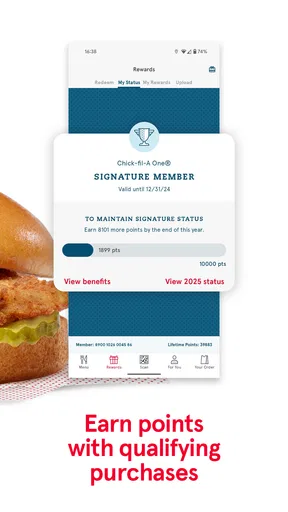
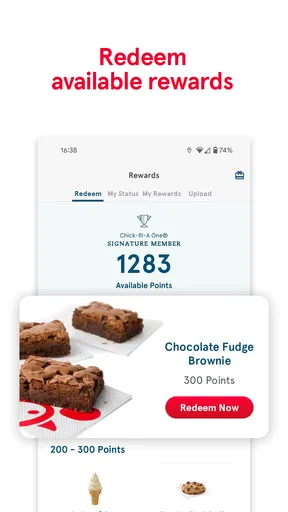
Now, let’s talk about the rewards program. Every purchase earns you points, which you can redeem for free food. It’s a pretty sweet deal, especially if you’re a regular. The app keeps track of your points, and the rewards section is easy to navigate, so you always know what freebies are within reach.
The useful habit here is to check the rewards area before placing an order, not after. That way, I can see what is available and decide whether to redeem something or simply keep collecting points. Rewards are a bonus, not a reason to order food I did not want in the first place; their value depends on how often Chick-fil-A is already part of your routine.
They also throw in some surprise offers from time to time, which adds a fun twist to the usual fast food routine. It's like getting a little gift for being a loyal customer.
Where other options may suit you better
Compared with a general restaurant-discovery or delivery app, this one is more direct when you have already picked Chick-fil-A. You are not using it to weigh a range of cuisines or providers; you are using a dedicated route to browse this menu, customize an order, and keep track of your own rewards. For a familiar order, that narrower scope feels helpful rather than restrictive.
On the other hand, if you are deciding among several nearby restaurants, a multi-restaurant service is a more natural starting point. It can bring different menus into one browsing session, while this app is built around Chick-fil-A. Likewise, someone who prefers to decide after seeing the restaurant’s options in person may not gain much from planning ahead in an app.
I would not choose this as a substitute for checking the meal details carefully or asking staff about a question that needs a personal answer. Customization makes routine preferences easier to express, but it is still sensible to review the order before submitting it. If your priority is comparing restaurant choices, coordinating different cuisines, or keeping app accounts to a minimum, another approach may fit better.
Small trade-offs that matter over time
The main cost is not money, since the app is free; it is the effort of creating and maintaining another account and remembering to use it. Order history is most useful once I have placed orders worth repeating, so a first-time user may not feel the convenience immediately. The app’s value grows with a steady routine rather than appearing all at once.
There is also a useful distinction between making an order easier and making a meal cheaper. Points and available rewards can improve the experience for a frequent customer, but they do not make every visit a bargain by default. I would treat the rewards as a modest extra and base my decision on whether I actually want the meal.
If you are setting it up for a household, decide whose account will manage the recurring preferences and rewards before everyone starts ordering separately. That keeps past orders and points from being scattered across accounts. For an occasional shared meal, simply checking each person’s choices before submitting is more important than trying to create a complicated routine around the app.
Who is likely to get the most from it?
I would recommend it to regular customers who have a usual order, want to personalize items, or would rather arrange pickup before arriving. It is also a sensible choice for someone who likes having order history and reward progress together instead of relying on memory. The current version is 2025.22.4, and the stated minimum operating-system requirement is version 9, so it is worth checking that an older device meets that requirement before planning to use it.
I would be less enthusiastic about it for someone who rarely eats at Chick-fil-A, does not want another account, or usually chooses food based on what is convenient nearby. A dedicated app cannot help much when the restaurant itself is not the preferred option. It is also not the right tool if the main goal is to browse many restaurants from one place.
Final Thoughts
Overall, the Chick-fil-A app is a must-have if you're a fan of their food. It makes ordering a breeze, offers great customization options, and rewards you for your loyalty. It’s like having a personal assistant for your chicken cravings. So, if you haven’t tried it yet, go ahead and give it a whirl. You might just find yourself using it more often than you think!
Pros
- User-friendly interface for easy navigation.
- Order customization with a wide range of options.
- Quick access to nearby locations and hours.
- Rewards program offers great discounts and freebies.
- Efficient curbside and in-store pickup options.
Cons
- Limited delivery areas may restrict access.
- Occasional app glitches disrupt user experience.
- Exclusive offers require frequent app checks.
- Lack of detailed nutritional information.
- Requires stable internet for optimal use.
FAQs for Chick-fil-A®
What features does the Chick-fil-A® app offer?
The Chick-fil-A® app provides a seamless experience for ordering food, earning rewards, and finding nearby locations. Users can customize their meals, save favorite orders, and receive exclusive offers. The app also allows for mobile payment and order tracking, ensuring a convenient and efficient dining experience.
How does the reward system work in the Chick-fil-A® app?
The Chick-fil-A® app features a tiered rewards program called Chick-fil-A One®. As users make purchases, they earn points which can be redeemed for free menu items. The more you use the app, the more points you accumulate, unlocking higher tiers with additional benefits and exclusive offers.
Is the Chick-fil-A® app available on both Android and iOS devices?
Yes, the Chick-fil-A® app is available for download on both Android and iOS platforms. Users can find it on the Google Play Store and Apple App Store, respectively. The app is designed to offer a user-friendly experience across different devices, ensuring accessibility for a wide range of customers.
Can I customize my order through the Chick-fil-A® app?
Absolutely! The Chick-fil-A® app allows for full customization of your orders. You can adjust ingredients, select preferred preparation methods, and add extras to your meals. This feature ensures that you can enjoy your meal exactly how you like it, providing a personalized dining experience.
How secure is the payment process on the Chick-fil-A® app?
The Chick-fil-A® app implements robust security measures to ensure safe transactions. It uses encryption to protect your payment information and offers options like Apple Pay and Google Pay for added security. Regular updates and security protocols are in place to maintain user data privacy and protection.


